Photo by Fabian Blank on Unsplash
myEvolv NX*: Where are Those Checkboxes (Fields) Series
Minimum Claim Batch Control Number Field
-Dani Evans
Remembering where all the important checkboxes and finance fields are when setting up finance in myEvolv can be overwhelming!
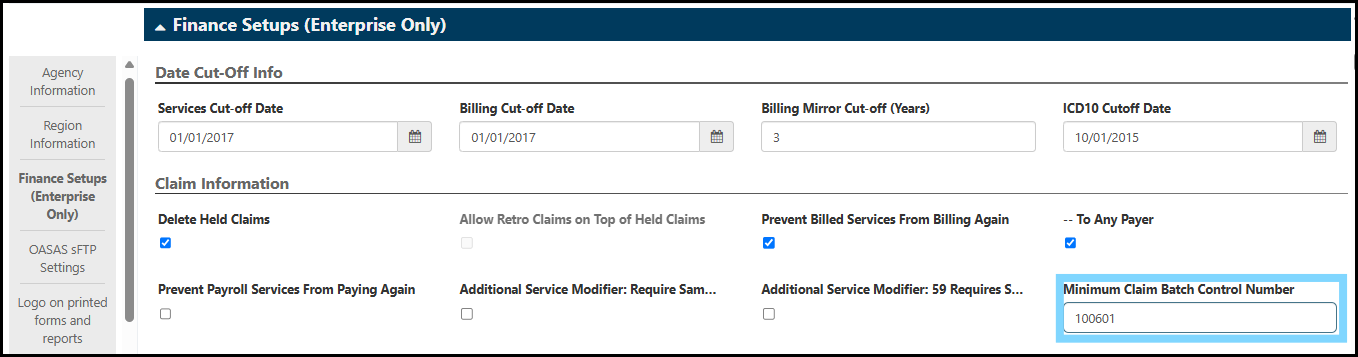
When in doubt, I check the Agency Setup breadcrumbs. There are so many random settings here. In this case we are looking for the Minimum Claim Batch Control Number Field where you can reset your minimum batch number for billing batches.
Why is this important?
Many receivers cannot accept a duplicate batch number when a batch is rejected or the upload fails. To prevent a control number from being recycled and potentially creating additional future issues with uploading claims, you can set a new minimum batch number.
- Breadcrumbs: Agency Setup > Agency > Agency > Agency Information
- Group: Finance Setups (Enterprise Only)
- Field: Minimum Claim Batch Control Number
Find the Minimum Claim Batch Control Number Field and update to a number higher than the last billing run.
- Example: If a batch with the control number 100600 is deleted, you can reset your minimum batch control number to 100601 to ensure that the 100600 is not recycled on the next billing run.
Once you are happy with your new batch number, make sure to save!
Questions? Contact us via email: [email protected]
*KHIT Consulting is not an affiliate of or associated in any way with Netsmart Technologies. Implement customizations at your own risk and test workflows and processes in development before implementing in production.
Netsmart does not support system customizations that are not outlined in their own documentation and resources.
KHIT Consulting is not responsible for any negative outcomes as the result of your implementation of custom processes.