Key Features of Maintain X
 -Rebekah Hedge
1. Mobile Interface
While most maintenance technicians are not regularly in front of a computer or laptop the mobile interface that exists within MaintainX makes receiving requests, updating tickets, taking notes, and reviewing history simple. The platform is offered to both Apple and Android users and allows users to update work orders, checklists and manage assets from their phone or tablet.
2. Automated Preventive Maintenance
MaintainX helps ensure that assets are maintained before breakdowns occur, increasing uptime and reducing repair costs. By utilizing the automated maintenance scheduling features built into MaintainX you are able to ensure optimal preventive maintenance with minimal future downtime.
 3. Requests & Work Orders
Easy to use submission forms allow staff to submit requests with the use of QR codes and links. Simple work orders are created automatically when requests are submitted. This allows managers and maintenance workers to easily track the status of every work order, assign tasks to team members, and set priority levels. The work orders and edits to them are then pushed to staff in real time.
 4. Real-Time Communication
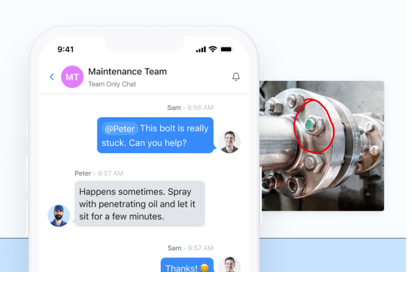
In-app chat and comment features allow for immediate updates, reducing miscommunications and enabling faster decision-making. Frustration between your maintenance department and departments submitting requests are quickly solved with this feature by allowing updates to be sent to the requester as maintenance workers submit them.
 5. Asset and Inventory Tracking
Maintain a digital record of assets, maintenance history, and inventory levels to improve planning and reduce waste. QR codes on each asset allow maintenance workers to scan the asset and quickly pull up historical service on the asset as well as instantly view the times that it out of commission and for how long. Inventory tracking allows you to be notified when a minimum number of items is reached based on jobs that require those items to alleviate the headache of missing parts when work is being done.
 6. Customizable Forms and Checklists
Request forms as well as maintenance checklists are customizable. These items can be easily customized and updated by the end user rather than needing constant support whenever there are workflow changes or changes in data points being collected.
 7. Reporting Dashboards
Reporting with MaintainX allows for you to track all costs associated with repairs and assets. Customizing reports is simple and intuitive in Maintain X. Any field that is captured within the system can be reported on and compared.

Questions? Contact us via email: [email protected]